So sorry to say but the answer is buy the 'Apple Time Capsule'

Right before you get excited the Belkin Hub is just the normal port duplicator - NOT the infamous 'Belkin Network USB Hub' - eg: the black one.
So don't get confused.
You don't need to use a Belkin Hub you can use any USB2 Hub the only good thing about this one is that it has no wall wart.
The storage I've got attached is not important really but just to show you that it works and is accessible.
(btw it is running via USB2 - though the hub/and drives support firewire that is inactive due to the Time Capsule only accessing drives through the USB interface).
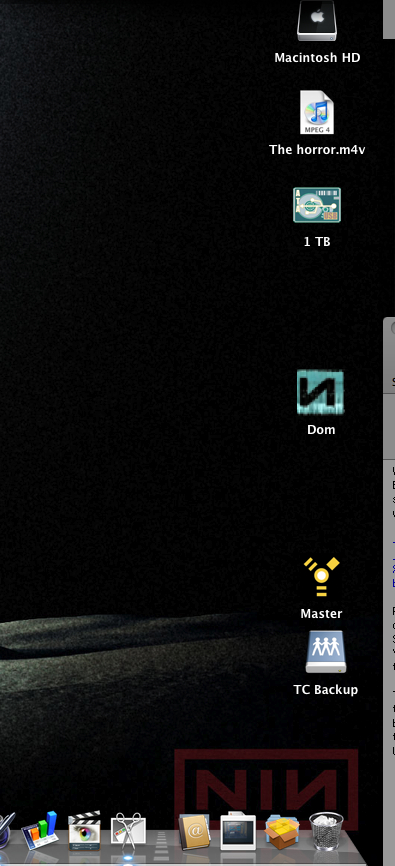
The picture below shows the Time Capsule Backup drive (TC internal drive) mounted, and the attached 1TB Lacie Drive and x2 D2 drives.
I'm well aware that the Time Capsule is a tad more expensive than the Belkin Network USB Hub - £60 versus £229.....which is quite alot more pennies!!
Right how does it all work in real life?
Well once you've gotten past setting up via Airport utility - name of network/do you wish to join your current wireless network or set up a new one (which if your running a mixed wireless card network eg: G and N) is a good idea to let the TC create a solely N network so it can transmit at higher speeds to those computers that have N cards in them.
The whole TC experience is pretty good ...been running it now for over a month, and it's been stable and reliable.
Your first backup to the TC should be done 'wired' (via ethernet cable) - I initiated back up of 160GB from my macbook pro (eg: everything) and it took 30hrs over ethernet.
After you've done that laborious task, you then can then switch back to over the wireless network back ups they are incremental so take as long as the data you've changed from previous back up, on the whole pretty swift for wireless attached storage.
The attached storage over the 'network' acts exactly like the storage is hardwired to your machine apart from the obvious speed difference - I was previously using FW800 so a slightly faster data rate than USB2 over an 'N' network!
However it has fulfilled my expectations of being able to access my storage remotely move files back and forth , and also exceeded what I believed it could do by being able to stream 'video' over the network.
Do I think that the TC is worth it's price?
Well at £229 worth every penny (considering it has a 500GB internal HD), and I have access to nearly a months worth of backup data so far.
More importantly everything on my Macbook is now backed up everyday automatically - that is pretty cool.




 Posts


