Showing posts with label Airport extreme. Show all posts

Sunday, June 28, 2009

Apple Time Capsule Network

Well for those of you that have been hitting on 'here' because of your Belkin Network USB hub problems and Mac OSX 10.5.7.... the picture (below) shows how you can resolve this once and for all (btw this will also work with an Apple Extreme Router as well)

So sorry to say but the answer is buy the 'Apple Time Capsule'

Time Capsule Network Set up.jpg


Right before you get excited the Belkin Hub is just the normal port duplicator - NOT the infamous 'Belkin Network USB Hub' - eg: the black one.
So don't get confused.
You don't need to use a Belkin Hub you can use any USB2 Hub the only good thing about this one is that it has no wall wart.

The storage I've got attached is not important really but just to show you that it works and is accessible.
(btw it is running via USB2 - though the hub/and drives support firewire that is inactive due to the Time Capsule only accessing drives through the USB interface).

The picture below shows the Time Capsule Backup drive (TC internal drive) mounted, and the attached 1TB Lacie Drive and x2 D2 drives.
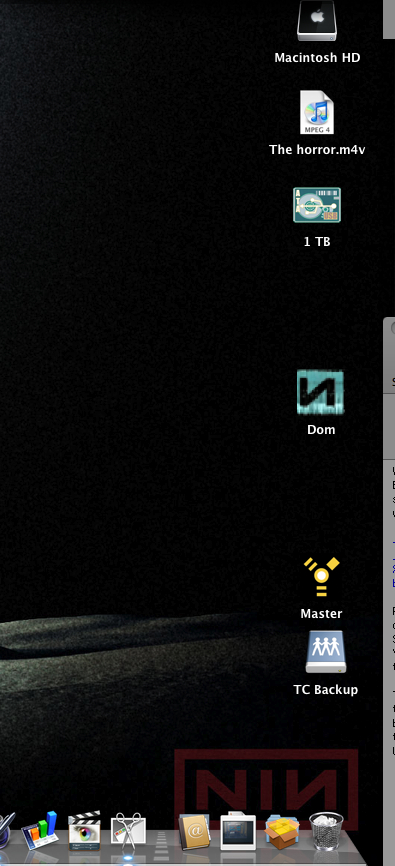
Screen crop.jpg


I'm well aware that the Time Capsule is a tad more expensive than the Belkin Network USB Hub - £60 versus £229.....which is quite alot more pennies!!


Right how does it all work in real life?
Well once you've gotten past setting up via Airport utility - name of network/do you wish to join your current wireless network or set up a new one (which if your running a mixed wireless card network eg: G and N) is a good idea to let the TC create a solely N network so it can transmit at higher speeds to those computers that have N cards in them.

The whole TC experience is pretty good ...been running it now for over a month, and it's been stable and reliable.
Your first backup to the TC should be done 'wired' (via ethernet cable) - I initiated back up of 160GB from my macbook pro (eg: everything) and it took 30hrs over ethernet.
After you've done that laborious task, you then can then switch back to over the wireless network back ups they are incremental so take as long as the data you've changed from previous back up, on the whole pretty swift for wireless attached storage.

The attached storage over the 'network' acts exactly like the storage is hardwired to your machine apart from the obvious speed difference - I was previously using FW800 so a slightly faster data rate than USB2 over an 'N' network!
However it has fulfilled my expectations of being able to access my storage remotely move files back and forth , and also exceeded what I believed it could do by being able to stream 'video' over the network.

Do I think that the TC is worth it's price?
Well at £229 worth every penny (considering it has a 500GB internal HD), and I have access to nearly a months worth of backup data so far.

More importantly everything on my Macbook is now backed up everyday automatically - that is pretty cool.

Wednesday, May 20, 2009

Belkin Network USB Hub and Mac OSX (10.5.7) again.....

Ok to update the story from a couple of days ago....
As you can see from the post earlier I was not enamored by my purchase of the Belkin Network Hub and it's inability to function in any shape or form within a stable useable environment of OSX 10.5.7

However as I write this post I am transferring files across the network and backing up to my 2TB of storage that has laid dormant (If the truth be known) since I jumped from a desktop to a Laptop.
The key for those who have run into the error known as 'what is an effing SXUTPT driver anyway!!'.. and I still can't find the answer....

Is....

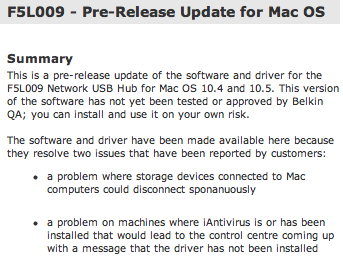
Download the Pre-release driver from the Belkin UK site (not the US site) this is what you are looking for on the site :
Belkin Pre-release notes.jpg

And then the download your after is :
Belkin Release details.jpg


Once this is downloaded it will give you an installer (ignore the disc that came with the Network Router- it's useless-) run the installer after having set up the router via the instructions in the manual.
You then will be prompted to restart your machine and your fingers will be crossed if your familiar with the SXUPTP driver issue!!
Belkin Control centre software will automatically start up , and if your drives are connected and turned on about 30secs later they will appear in the control centre interface mounted.
If you investigate the the 'General' panel you'll see this :
Belkin Hub Settings driver info.jpg
which tells you at last the SXUTPT driver is installed ...hurrah!!

A note of caution if you are running a laptop (like I am) you may be tempted to close the lid to put the laptop into 'sleep' mode while the drives are connected- you can do this - but you will only do it once! because it completely locks up your system, so I strongly advise you don't try that!!
Disconnect all drives and then close laptop for sleep mode - You don't have to Quit the belkin software as well...just have to make sure you disconnect all the drives connected via the Belkin control panel.

Hope this is of some use to you guys out there who have HDD's sitting around and laptop where the 'leads' aren't just quite long enough.
For less than £60 it's cheap way to 'network' your drives.
Transfer rates are about 1GB to 7mins so as a background transfer it's pretty acceptable in my eyes at least.
Also you can 'stream' video back off the drives to your laptop and then hence to your TV if required.


Sunday, May 17, 2009

Belkin Network USB Hub and Mac OSX (10.5.7)

images.jpeg


Well it is now 22:29 and I have eventually given up on trying to get this to work with my Macbook Pro (Unibody) started at 16:00ish.
If you install it under it under a normal user it will tell you (very irritatingly) that it was unable to install the 'SXUPTP' driver....whatever this does and does not do is lost in geek hell......

I then read on an apple forum about using terminal commands within the 'Safe Boot' environment (not being too fond of unix commands I stayed away from Terminal) however I did try the safe boot option for install - that's after I'd spent 30mins downloading the 10.5x driver from Belkin.com (lot of good that was).
The SXUPTP problem does not rear it's head under 'Safe Boot' and then you restart under normal user ...success so far.
Alas however when you restart after using the drives, SXUPTP driver not installed rears it's ugly godforsaken head again...and so off you go rebooting in safe mode and installing and rebooting in user mode and using and then finding out when you try to eject the drives via the Belkin Control Hub interface that sod all happens apart from your once stable computer has crashed big time....
When it works the transfer speed is acceptable - a bit like the speed of moving a file from one memory stick to another.

However the control interface is basic and buggy ..the reliability is probably 0.5 out of 10.
The support for the Mac OS is completely just not there.

So to summarize you do get what you pay for and an Airport extreme base station would be a better idea maybe, or a NAS drive that has been tried and tested on the Mac OS. So that will be my next step once i've got the funds.

Buy it at your peril